
Most early-stage and mid-market B2B sales teams in India do not need a CRM on day one. What they need is a system — a clear, shared, consistently updated view of every deal, every contact, and every next action — that the whole team can access from anywhere.
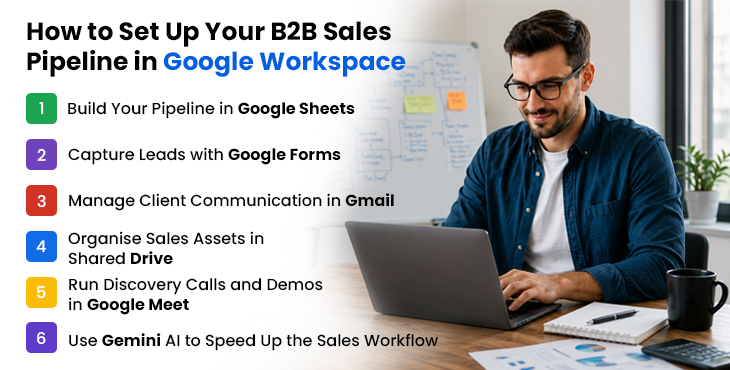
Google Workspace builds that system with tools your team already has. Google Sheets as the pipeline backbone. Gmail for all client communication. Shared Drive for every proposal, contract, and pitch deck. Google Meet for discovery calls and demos. Google Forms for lead intake. Gemini AI to cut the time spent on follow-up emails and call notes.
This guide shows you exactly how to set it up — step by step — with a working pipeline structure, a file organisation system, and the specific Google Workspace features that make it work for Indian B2B sales teams in 2026.
If you are also evaluating whether Google Workspace is the right platform overall, see how it compares to Microsoft 365 and Box on AI, storage, and India pricing.
Why Google Workspace Before a CRM?
CRMs like Salesforce, HubSpot, and Zoho CRM are powerful tools — but they come with a cost that goes beyond the licence fee. Setup takes weeks. Data migration is painful. Training takes time away from selling. And for a team of 5 to 30 salespeople working a manageable pipeline, a full CRM often adds complexity without adding clarity.
The common failure mode for early Indian B2B sales teams is this: they buy a CRM, spend two months configuring it, and then the sales team goes back to WhatsApp and Excel because the CRM is too complicated for the pace they actually work at.
Google Workspace avoids this entirely. The tools are already familiar. The setup takes hours, not weeks. The data lives where the team already works — in Gmail, Drive, and Sheets — so adoption is not a project; it is just a workflow change.
This approach works well for:
- B2B SaaS companies with 5–50-person sales teams
- Professional services firms managing a relationship-driven pipeline
- Indian SMEs with deal cycles of 2 weeks to 6 months
- Teams that want to validate their sales process before investing in CRM infrastructure
When your pipeline grows beyond 200 active deals, or when you need automated sequences, territory management, or deep revenue forecasting — that is when a CRM earns its keep. Until then, Google Workspace handles more than most teams realise.
Step 1: Build Your Pipeline in Google Sheets
Google Sheets is the backbone of your pipeline. Done well, it functions as a lightweight CRM — with real-time collaboration, mobile access, and Gemini AI analysis built in.
The Core Pipeline Structure
Create a new Google Sheet in your Shared Drive (not a personal Drive — this is critical, covered in Step 4). Set up the following columns:
| Column | What to track |
|---|---|
| Company | Prospect company name |
| Contact name | Primary decision-maker |
| Contact email | Linked to Gmail thread |
| Deal stage | Lead / Qualified / Proposal / Negotiation / Closed Won / Closed Lost |
| Deal value (₹) | Estimated contract value |
| Probability (%) | Likelihood of closing |
| Weighted value (₹) | Deal value × probability (formula) |
| Owner | Sales rep responsible |
| Next action | Specific next step |
| Next action date | Due date for next action |
| Last activity | Date of last contact |
| Notes | Key context, objections, decision timeline |
Essential Formulas to Add
Weighted pipeline value (in a summary row at the top):
=SUMPRODUCT(E2:E100, F2:F100/100)
This gives you a real-time weighted forecast without any manual calculation.
Days since last activity (to flag stale deals):
=TODAY()-L2
Format this column with conditional formatting — red for 14+ days, amber for 7–13 days — so neglected deals are visible at a glance.
Deals by stage count:
=COUNTIF(D2:D100, “Qualified”)
Add a summary table at the top of the sheet with a count and total value per stage. This gives you an instant pipeline health view every time you open the sheet.
Tabs to Add
- Active Pipeline: the main view above
- Closed Won: move deals here when won, with closing date and final value
- Closed Lost: move deals here with a loss reason column
- Contact: a running list of all contacts with company, role, email, phone, and LinkedIn
- Weekly Review: a simple log of pipeline changes each week for manager check-ins
Gemini AI in Sheets
In 2026, Gemini AI in Sheets can analyse your pipeline data on demand. Ask it to identify deals that have been stuck in the same stage for more than 30 days, calculate your average deal cycle by stage, or flag which sales rep has the highest win rate by deal size. This kind of analysis previously required a business analyst or a CRM’s reporting module — in Google Workspace Business Standard, it is built in.
Step 2: Capture Leads with Google Forms
Manual data entry into a pipeline sheet is where accuracy breaks down. Every lead that comes in through a website form, an event sign-up, or a partner referral should flow directly into your pipeline without a human copying and pasting.
Setting Up Lead Capture
- Create a Google Form with the fields your team needs: company name, contact name, email, phone, how they heard about you, and a brief description of their need.
- In the Form settings, link the responses to a Google Sheet — Google Forms does this automatically with one click.
- Set up a notification in the Sheet to email your sales lead whenever a new row is added.
This takes 20 minutes to build and eliminates manual lead entry. Every inbound lead has a timestamped record from the moment it arrives.
Other Form Use Cases for B2B Sales
Event and webinar registration: Capture attendee details directly into your pipeline sheet, pre-qualified by the fact that they registered for your event.
Partner referral intake: Give partners a dedicated form to submit referrals. Referrals appear in a separate tab, tagged with the referring partner’s name.
Post-demo feedback: A short form sent after a discovery call captures the prospect’s self-reported priorities and timeline — useful context for the proposal stage.
Internal deal intake: For inbound leads that come through phone or email, a quick internal form ensures the sales rep captures the right fields before opening a deal in the pipeline.
Step 3: Manage Client Communication in Gmail
All client-facing communication should run through Gmail — not personal email, not WhatsApp, not a rep’s personal account. This ensures the team has visibility, the communication history is searchable, and deals do not disappear when a rep leaves.
Gmail Labels for Pipeline Management
Set up a label structure that mirrors your deal stages. In Gmail, labels function like folders but can be applied in combination. A recommended structure:
- Pipeline / Lead
- Pipeline / Qualified
- Pipeline / Proposal Sent
- Pipeline / Negotiation
- Pipeline / Closed Won
- Pipeline / Closed Lost
Apply the relevant label to every email thread for an active deal. When a deal moves stage, update the label. This gives you a filtered view of all email threads at any pipeline stage in two clicks.
Gmail Filters for Automatic Organisation
Set up filters to automatically label inbound emails from known prospect domains. When a prospect at targetcompany.com emails you, the thread is automatically labelled as a pipeline contact — no manual tagging required.
Email Templates for Repeatable Outreach
Gmail’s Templates feature (Settings → Advanced → Templates) stores your most-used emails — follow-up after a demo, proposal cover note, check-in after no response, contract send. One click inserts the template, saving 5–10 minutes per email and ensuring consistent, professional communication across the whole team.
Gemini AI in Gmail
The “Help me write” feature in Gmail drafts follows up emails, proposal cover notes, and re-engagement messages from a short prompt. For a sales rep sending 20–30 emails per day, this saves meaningful time. AI thread summarisation condenses long prospect email chains — useful when handing a deal to a colleague or preparing for a call after a few days away.
Your Sales Team Deserves Tools That Work Together
Gmail, Sheets, Meet, and Drive — all connected, all included. Get Google Workspace Business Standard for your sales team at ₹864/user/month through FES Cloud, with GST invoicing and zero-data-loss migration.
Step 4: Organise Sales Assets in Shared Drive
The single most common sales file problem in Indian B2B teams: a pitch deck lives on one rep’s laptop, gets emailed back and forth in eight versions, and no one is sure which is current when it is time to send to a prospect.
Shared Drives solve this permanently. Every sales asset lives in one place, is owned by the organisation, is accessible to every rep, and is always current.
Recommended Shared Drive Structure for B2B Sales
Sales/
├── Pitch Decks/
│ ├── Master Deck (current)
│ └── Versions/
├── Proposals/
│ ├── [Client Name] – [Date]/
│ │ ├── Proposal_v1.docx
│ │ └── Signed_Contract.pdf
├── Case Studies/
│ ├── By Industry/
│ └── By Use Case/
├── Pricing Sheets/
│ ├── Standard Pricing (current)
│ └── Custom Quotes/
│ └── [Client Name] – [Date]/
├── Contracts & Legal/
│ └── [Signed contracts by client]/
└── Competitive Intelligence/
└── Competitor comparisons, objection handling guides
Why Shared Drive Matters When Team Members Leave
When a sales rep leaves and their deals are handed to a colleague, every file, proposal, and client document is still in the Shared Drive — owned by the organisation, not the individual. The incoming rep has full context from day one. With personal Drive or local files, this transition is painful and sometimes impossible.
Shared Drives are available from Google Workspace Business Standard (₹864/user/month). This is one of the clearest reasons B2B sales teams should not be on Business Starter.
Step 5: Run Discovery Calls and Demos in Google Meet
Google Meet handles the full video meeting workflow for B2B sales — from initial discovery calls to multi-stakeholder demos to contract review sessions.
The Sales Meeting Workflow in Google Meet
Scheduling: Every meeting is booked through Google Calendar with an automatic Meet link. No “what’s the Zoom link?” messages before the call. Prospects receive a Calendar invite with a one-click join link — professional and frictionless.
During the call: Screen sharing for demos works cleanly on Meet. The noise cancellation handles calls from varied environments. For multi-stakeholder calls, up to 150 participants join on Business Standard — sufficient for any enterprise sales call.
After the call – AI transcripts and action items: This is where Google Meet earns its keep for sales teams. “Take notes for me” generates an automatic transcript and a structured list of action items after every call. For a sales rep, this means:
- No time spent writing up call notes immediately after
- A searchable record of every discovery call, every objection raised, every commitment made
- Action items that can be copied directly into the pipeline sheet
- A transcript to share with a manager or hand to a colleague taking over the deal
For Indian B2B sales teams doing 5–10 calls per day across the team, this feature alone recovers 30–60 minutes of administrative time daily.
Recording for deal review: Record demos and complex discovery calls (with prospect consent) and save them to Shared Drive. Sales managers can review calls for coaching without needing to attend. New reps can watch recordings of successful deals to understand what works.
For sales teams split across cities — Delhi, Mumbai, Bangalore, Jaipur — Google Workspace supports the full hybrid sales workflow beyond just video calls.
Step 6: Use Gemini AI to Speed Up the Sales Workflow
Gemini AI is embedded across every Google Workspace app, and for B2B sales teams, it removes friction from the most time-consuming parts of the workflow.
Drafting proposals in Docs: Give Gemini a brief — client name, their key requirement, your proposed solution, pricing — and it generates a full proposal draft. The rep edits and refines rather than writing from scratch. For a team sending 10–20 proposals per week, this is a significant time saving.
Summarising long email threads: Before a call with a prospect you have not spoken to in three weeks, ask Gemini to summarise the email thread. Two sentences of context instead of scrolling through 15 emails.
Pipeline analysis in Sheets: Ask Gemini to analyse which deals have been in the Proposal stage for more than 21 days, or calculate your team’s average deal cycle for the last quarter. No formula knowledge required.
Follow-up email drafts: After a discovery call, prompt Gemini with the three key points from the conversation and ask it to draft a follow-up email. Review, adjust the tone, send.
Generating call briefs: Before an important call, ask Gemini to pull together everything in the relevant Drive folder — proposal, email summary, previous call transcript — into a one-page brief. Walk into every call prepared.
Gemini AI is included in Business Standard (₹864/user/month) and Business Plus (₹1,700/user/month) at no additional cost.
Deep dive: How Gemini AI improves productivity across Google Workspace →
When to Move from Google Workspace to a CRM
Google Workspace handles the B2B sales workflow effectively up to a certain scale, and in most cases, it replaces tools like Slack, Zoom, and Notion at a fraction of the cost. Here are the clear signals that it is time to add a CRM instead.
You have more than 200 active deals at any time: A Sheets-based pipeline becomes difficult to manage at high deal volumes. CRM filtering, automation, and reporting become genuinely necessary.
You need automated email sequences: Google Workspace does not support automated multi-step outreach sequences. If your sales process relies on automated follow-ups triggered by prospect behaviour, you need a CRM or a sales engagement tool.
You need territory management or complex team hierarchies: Assigning deals by geography, managing rep quotas, and enforcing territory rules require CRM-level structure.
You need deep revenue forecasting: Sheets-based weighted pipeline is useful but limited. Sophisticated forecasting models — with scenario planning, historical trend analysis, and AI-powered projections — require a dedicated CRM or BI tool.
Your compliance requirements demand a system of record: For regulated industries or enterprise clients requiring formal audit trails of all sales activity, a CRM provides the documentation structure that Sheets cannot.
Until these triggers are present, Google Workspace delivers the clarity and collaboration a B2B sales team needs — at a fraction of the cost of a CRM stack.
Which Google Workspace Plan Do Sales Teams Need?
| Feature | Business Starter (₹270) | Business Standard (₹864) | Business Plus (₹1,700) |
|---|---|---|---|
| Gmail + labels + templates | ✅ Included | ✅ Included | ✅ Included |
| Google Sheets pipeline | ✅ Included | ✅ Included | ✅ Included |
| Google Forms lead capture | ✅ Included | ✅ Included | ✅ Included |
| Shared Drives | ❌ Not included | ✅ Included | ✅ Included |
| Meet recording + AI transcripts | ❌ Not included | ✅ Included | ✅ Included |
| Gemini AI (full) | ❌ Not included | ✅ Included | ✅ Included |
| 2 TB storage | ❌ 30 GB / user | ✅ 2 TB pooled / user | ✅ 5 TB pooled / user |
| Google Vault / eDiscovery | ❌ Not included | ❌ Not included | ✅ Included |
Business Starter (₹270) is not sufficient for most B2B sales teams.
The absence of Shared Drives means files live in personal accounts and leave with reps. No meeting recording means no call review, no coaching, no async deal handover. No full Gemini AI means no AI-assisted proposals, emails, or pipeline analysis.
Business Standard (₹864) is the right plan for most Indian B2B sales teams.
It includes every feature in this guide — Shared Drives, Meet recording and AI transcripts, full Gemini AI, and 2 TB storage. For a 10-person sales team, the total annual cost through FES Cloud is ₹1,03,680 — a fraction of what a comparable CRM licence would cost.
Business Plus (₹1,700) is right for sales teams in regulated industries
Financial services, legal, healthcare — where deal communications need to be archived and auditable. Google Vault and advanced DLP provide the compliance infrastructure these teams require.
Order Business Standard via FES Cloud — ₹864/user/month →
Compare all plans in detail: Google Workspace Starter vs Standard vs Plus — complete India comparison →
Ready to Build a Smarter Sales Pipeline?
Get Google Workspace for your B2B sales team at ₹864/user/month — with GST invoicing, free migration, and 24/7 local support from FES Cloud.