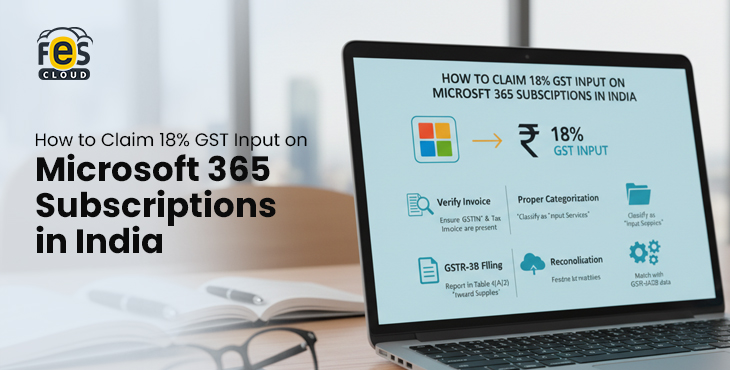
Microsoft 365 subscriptions in India come with 18% GST—but many businesses don’t realize that this cost can be recovered.
If you’re a startup, SME, or growing company using Microsoft 365 for email, collaboration, and productivity, you may be eligible to claim GST Input Tax Credit (ITC) on your subscription. This means the GST you pay doesn’t have to be a final expense—it can be offset against your overall tax liability.
However, claiming GST input on SaaS products like Microsoft 365 isn’t always straightforward. Missing GST details, incorrect invoices, or non-compliant vendors can prevent you from claiming ITC.
In this guide, we’ll explain:
- Whether GST applies to Microsoft 365 in India
- Who can claim input tax credit (ITC)
- Step-by-step process to claim 18% GST
- Common mistakes businesses should avoid
By the end, you’ll know exactly how to reduce your Microsoft 365 costs legally and efficiently under India’s GST framework.
📌 What is GST on Microsoft 365 in India?
Microsoft 365 is not just a software product—it is delivered as a subscription-based cloud service (Software-as-a-Service or SaaS). Under India’s GST framework, SaaS products are classified as OIDAR (online information and database access or retrieval services).
Because of this classification, Microsoft 365 subscriptions are subject to 18% GST in India, regardless of whether you are purchasing them monthly or annually.
To better understand how Microsoft 365 pricing varies across different plans and business needs, refer to our in-depth guide on Microsoft 365 for Indian businesses, which covers plans, features, and cost considerations in detail.
💡 Why Microsoft 365 Attracts 18% GST
Under India’s GST law:
- Digital services delivered over the internet
- Without physical delivery
- With automated provisioning (like licenses, email, cloud storage)
👉 are treated as taxable services
Since Microsoft 365 includes:
- Business email (Exchange)
- Cloud storage (OneDrive)
- Collaboration tools (Teams, SharePoint)
- Office apps (Word, Excel, Outlook)
…it clearly falls under this taxable category.
Services like cloud storage, business email, and SaaS platforms fall under digitally delivered services with minimal human intervention, making them taxable under GST.
🧾 How GST is Applied to Your Subscription
Whenever you purchase a Microsoft 365 plan, your invoice typically includes:
- Base subscription cost
- 18% GST
- Total payable amount
Example:
- Subscription Plan: ₹1,000/month
- GST @18%: ₹180
- Total Invoice Value: ₹1,180
👉 This GST component is what businesses can potentially claim back as Input Tax Credit (ITC).
🏢 Who Collects the GST?
This is a crucial detail that many businesses overlook.
1. Buying Through an Indian Microsoft Partner (Recommended)
When you purchase from a certified Microsoft partner in India:
- The partner charges GST
- The invoice includes valid GSTIN details
- The transaction is recorded in the Indian GST system
- ITC claim process becomes straightforward
👉 This is the most reliable method for businesses planning to claim GST input.
2. Buying Directly from Microsoft
If you purchase directly using an international billing setup:
- GST may still be applicable under OIDAR rules
- An invoice may come from a foreign entity
- GST compliance and reporting may vary
- ITC eligibility can become unclear or complicated
👉 Many businesses face issues claiming ITC in such cases due to invoice mismatch or reporting gaps.
⚠️ Key Business Implication
At first glance, Microsoft 365 pricing may seem 18% higher because of GST.
But that’s not the real cost.
👉 For GST-registered businesses, this 18% is not an expense—it’s a recoverable tax (subject to eligibility).
This means:
- Your actual cost is lower than what you pay upfront
- Proper billing and compliance can significantly improve cost efficiency
- Choosing the right purchase channel (partner vs direct) directly impacts your ability to recover GST
✅ Can You Claim GST Input on Microsoft 365 in India?
Yes—businesses in India can claim Input Tax Credit (ITC) on the 18% GST paid on Microsoft 365 subscriptions.
Under the GST law, businesses can claim Input Tax Credit (ITC) on services used for business purposes, provided compliance conditions such as valid invoices and vendor reporting are met.
However, this is not automatic.
To successfully claim GST input, your business must meet specific eligibility conditions under GST law, and the transaction must be properly recorded and compliant.
💡 What Input Tax Credit (ITC) Means in This Context
Input Tax Credit allows businesses to:
👉 Reduce their GST liability by claiming credit for the GST already paid on business expenses
In the case of Microsoft 365:
- You pay 18% GST on your subscription
- That GST amount can be adjusted against the GST you collect from your customers
📊 Simple Example
Let’s say:
- You pay ₹1,180 for Microsoft 365
- ₹1,000 = subscription
- ₹180 = GST
- Your business collects ₹5,000 GST from clients
👉 You can reduce your payable GST:
- GST payable: ₹5,000
- Less ITC (Microsoft 365): ₹180
- Final GST liability: ₹4,820
🧾 Who is Eligible to Claim ITC on Microsoft 365?
Not every user qualifies. You must meet all of the following conditions:
1. Your Business Must Be GST Registered
- You need a valid GSTIN (GST Identification Number)
- ITC cannot be claimed by unregistered individuals or businesses
👉 This means freelancers or small businesses under the GST threshold may not be eligible (unless registered voluntarily)
2. Subscription Must Be Used for Business Purposes
Microsoft 365 should be used for:
- Business communication (email)
- Internal collaboration (Teams, SharePoint)
- Document management (OneDrive, Office apps)
Since Microsoft 365 is used for business communication, document management, and internal collaboration, it also contains sensitive company data. Understanding how this data is protected is equally important for compliance and risk management. You can explore Microsoft 365 security features for businesses to understand how Microsoft ensures data protection for Indian companies.
❌ If used for personal purposes, ITC is not allowed
3. You Must Have a Valid GST Invoice
This is one of the most critical requirements.
Your invoice must include:
- Supplier’s GSTIN
- Your business GSTIN
- Invoice number & date
- GST amount is clearly mentioned
👉 Without a compliant invoice, ITC will be denied
4. Vendor Must Be GST-Compliant
Your vendor (Microsoft partner or provider) must:
- File GST returns correctly
- Upload your invoice details to the GST portal
👉 If they don’t:
- Your invoice may not appear in GSTR-2B
- You may not be able to claim ITC
5. Invoice Must Reflect in Your GSTR-2B
Before claiming ITC, always verify:
- The invoice appears in your GSTR-2B statement
- Details match your records
👉 This is a mandatory reconciliation step under GST compliance
Many businesses start using Microsoft 365 during cloud migration or digital transformation initiatives. If you’re planning a transition, this Microsoft 365 migration checklist can help you understand the steps involved and ensure a smooth setup.
⚠️ When You CANNOT Claim GST Input
You may lose ITC eligibility if:
- GSTIN is missing or incorrect on the invoice
- You purchased from a non-compliant or unregistered vendor
- The invoice is not uploaded to the GST portal
- Subscription is used for personal/non-business purposes
- You fail to claim ITC within the allowed time period
🧠 Why Many Businesses Fail to Claim ITC (Important Insight)
Even though ITC is allowed, many SMEs in India:
- Don’t add GSTIN during purchase
- Buy from global billing systems without proper GST compliance
- Don’t reconcile invoices with GSTR-2B
- Work with vendors who don’t file returns properly
👉 Result: They end up treating GST as a cost instead of recovering it
🔗 What This Means for Your Microsoft 365 Purchase
If everything is done correctly:
✔ The 18% GST is recoverable
✔ Your effective subscription cost reduces
✔ Your tax efficiency improves
But if compliance is ignored:
❌ You lose ITC
❌ Your cost increases unnecessarily
❌ You face potential audit issues
🧾 Step-by-Step Process to Claim GST Input on Microsoft 365 in India
Claiming Input Tax Credit (ITC) on your Microsoft 365 subscription is not just a compliance activity done at the time of filing returns—it is a process that begins the moment you make the purchase and continues through invoicing, reconciliation, and reporting.
Many businesses assume that since GST is charged, they will automatically be able to claim it back. In reality, ITC is only allowed when multiple conditions are satisfied across different stages, and even a small gap—such as an incorrect invoice or a vendor filing delay—can prevent you from recovering the tax.
To ensure you successfully claim GST input on Microsoft 365, it’s important to understand how the process flows in practice.
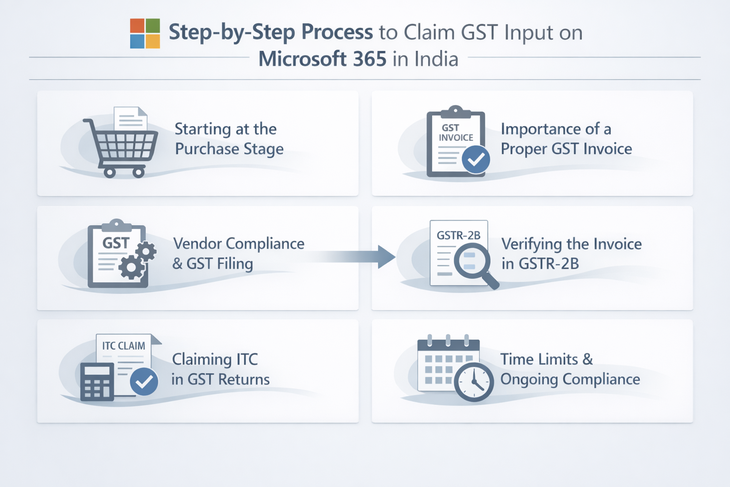
Starting at the Purchase Stage
The first and most important step happens when you subscribe to Microsoft 365. At this stage, your business must ensure that the purchase is made using accurate GST-registered details.
This includes your GSTIN, legal business name, and registered address. These details must match exactly with what is recorded in the GST system. Even minor inconsistencies—such as a variation in business name or an incorrect GST number—can result in the invoice not being properly linked to your GST account.
This is where many businesses unknowingly make mistakes. They either skip entering GST details during checkout or rely on default billing information, which later makes the invoice unusable for ITC purposes.
Importance of a Proper GST Invoice
Once the subscription is activated, the next step is receiving and verifying the invoice. This is not a formality—it is a legal requirement for claiming ITC.
A valid GST invoice should clearly establish that tax has been charged and identify both the buyer and the seller correctly. In the case of Microsoft 365, the invoice should reflect:
- The supplier’s GSTIN
- Your business GSTIN
- A clear description of the service (subscription plan)
- The taxable value and the 18% GST charged
If any of these elements are missing or incorrect, the invoice may not be considered valid under GST rules. This means that even though you paid GST, you may not be allowed to claim it back.
Because of this, it’s important to actively review invoices instead of simply downloading them for records.
Vendor Compliance and GST Filing
After the invoice is issued, the responsibility shifts to the vendor or service provider. For you to claim ITC, the vendor must declare this transaction in their GST returns, specifically in their GSTR-1 filing.
This step is critical because the GST system works on a matching mechanism. Your ability to claim ITC depends on whether the supplier has reported the same transaction to the government.
If the vendor fails to upload the invoice, delays filing, or makes errors in reporting, the transaction will not reflect in your GST records. As a result, you may be temporarily or permanently unable to claim ITC.
This is one of the main reasons businesses prefer working with reliable and compliant Microsoft 365 partners, as it reduces the risk of such mismatches.
Choosing the right plan and purchase method is equally important, especially when evaluating cost, features, and long-term value. You can also compare platforms in our guide on Microsoft 365 vs Google Workspace to make a more informed decision.
Verifying the Invoice in GSTR-2B
Before claiming ITC, businesses are required to verify that the invoice appears in their GSTR-2B statement, which is an auto-generated document reflecting eligible input tax credit for a given period.
This step acts as a checkpoint. It ensures that:
- The vendor has uploaded the invoice
- The GST amount matches what you were charged
- There are no discrepancies in reporting
If the invoice does not appear in GSTR-2B, it is a signal that something is wrong—either the vendor has not filed correctly or the details do not match. In such cases, the correct approach is to resolve the issue with the vendor before proceeding with the claim.
Skipping this verification step can lead to incorrect ITC claims, which may later be reversed along with penalties.
Claiming ITC in GST Returns
Once the invoice has been verified, the actual claim is made while filing your GST return (GSTR-3B). Here, the GST paid on Microsoft 365 is declared as Input Tax Credit, which is then adjusted against your output tax liability.
In practical terms, this means that the GST you paid on your subscription reduces the total GST you owe to the government.
This is the stage where the financial benefit becomes visible. However, it is only possible because all prior steps—purchase, invoicing, vendor compliance, and reconciliation—were handled correctly.
Time Limits and Ongoing Compliance
Another important aspect to keep in mind is timing. GST law allows ITC claims only within a specified period. If businesses delay the process or fail to reconcile invoices regularly, they risk losing the credit entirely.
This is why ITC should not be treated as a once-a-year activity. Instead, it should be part of regular monthly or quarterly GST compliance, ensuring that all eligible credits are claimed on time.
Why This Process Matters More Than It Seems
At a surface level, claiming GST input on Microsoft 365 may look like a simple accounting step. But in reality, it reflects how well your business manages compliance, vendor coordination, and financial efficiency.
Businesses that follow this process carefully treat GST as a recoverable input, while others unknowingly absorb it as an added cost.
Over time, this difference can significantly impact overall software and operational expenses.
⚠️ Common Mistakes to Avoid When Claiming GST on Microsoft 365
Not Adding GSTIN at the Time of Purchase
Many businesses forget to enter their GSTIN while purchasing Microsoft 365, especially when using quick checkout or personal accounts. Once the invoice is generated without GST details, it becomes difficult to revise, making the GST paid ineligible for Input Tax Credit (ITC).
Incorrect or Mismatched Billing Details
Even small errors in GSTIN, business name, or address can cause issues. If invoice details do not exactly match GST records, the transaction may not reflect correctly in filings, leading to rejection or delays in claiming ITC during reconciliation.
Buying from Non-Compliant or International Vendors
Purchasing from vendors who do not follow Indian GST norms can create complications. Invoices may lack proper GST structure or may not be reported correctly in the GST system, making it difficult or impossible to claim input tax credit.
Vendor Not Uploading Invoice in GST Returns
ITC depends on whether your vendor uploads the invoice in their GSTR-1 return. If they delay or fail to report it, the transaction will not appear in your GSTR-2B, which means you cannot claim the GST credit.
Many of these issues arise due to a lack of clarity around licensing and purchasing options. Understanding how plans differ and how billing works can help avoid such mistakes—covered in detail in our Microsoft 365 vs Google Workspace comparison guide.
Skipping GSTR-2B Verification Before Claiming ITC
Some businesses claim ITC based only on invoices received, without verifying GSTR-2B. This can lead to mismatches between claimed and eligible credit, resulting in reversals, penalties, or notices from GST authorities later.
Missing ITC Claim Deadlines
GST rules allow ITC claims only within a specific time frame. If businesses fail to reconcile invoices regularly or delay filing returns, they may permanently lose the ability to claim GST input, even if all other conditions are met.
Using Microsoft 365 for Non-Business Purposes
ITC is only allowed for business-related usage. If subscriptions are used partially for personal work or unclear purposes, it may create compliance issues during audits and lead to partial or complete denial of GST credit.
Poor Record-Keeping and Documentation
Failing to maintain proper records, such as invoices, payment proofs, and GST filings, can create problems during audits. Without clear documentation, businesses may struggle to justify their ITC claims, increasing the risk of disputes or reversals.
Choosing Vendors Based Only on Price
Opting for the cheapest provider without checking GST compliance can lead to bigger issues later. Non-compliant vendors may not file returns correctly or provide proper invoices, ultimately resulting in the loss of ITC and increasing the overall cost of Microsoft 365.
📌 Why Avoiding These Mistakes Matters
Individually, these issues may seem minor. But together, they determine whether your business treats GST as a recoverable input or an additional cost.
Businesses that proactively manage these details consistently recover their GST, while others end up increasing their effective software expenses by 18% without realizing it.
🤝 Why Buying Microsoft 365 from the Right Partner Matters for GST Compliance
Claiming GST input on Microsoft 365 depends not just on the process, but also on where you purchase your subscription from. The right partner can simplify compliance, reduce errors, and improve your chances of successfully claiming Input Tax Credit (ITC).
📄 Proper GST Invoicing and Documentation
When you purchase Microsoft 365 through a reliable, GST-compliant partner in India, invoices are generated with accurate GST details. This includes correct GSTIN mapping, clear tax breakdown, and proper service classification.
This ensures your invoices meet GST requirements from the beginning, reducing the risk of rejection during ITC claims.
📊 Consistent GST Filing and Reporting
ITC eligibility depends on whether your vendor reports the transaction in their GST returns. A compliant Microsoft 365 partner ensures that invoices are uploaded correctly and on time.
This improves the chances of your invoices appearing in GSTR-2B without delays or mismatches, making the claim process smoother.
🛠 Support for Billing and Compliance Issues
In real-world scenarios, issues like invoice mismatches or missing entries in GSTR-2B can occur. A reliable partner provides support in resolving these problems quickly.
Instead of handling compliance challenges alone, your team gets assistance in correcting invoices and ensuring proper reporting.
⚠️ Challenges with Non-Compliant Vendors
Businesses that purchase from unstructured or international billing systems often face issues such as:
- Delayed or unclear invoices
- Lack of GST-specific support
- Difficulty resolving discrepancies
- Limited accountability in compliance
These challenges can directly impact your ability to claim GST input.
💰 Long-Term Cost Impact
Choosing a cheaper vendor without checking compliance may seem cost-effective initially. However, if ITC cannot be claimed due to errors, the 18% GST becomes an additional cost.
Over time, this increases your total Microsoft 365 expenses and creates avoidable financial inefficiencies.
👉 For businesses looking for a seamless experience—from subscription to GST-compliant invoicing and ongoing support—working with a certified Microsoft 365 partner in India can make the entire process significantly smoother.
✅ Conclusion: Reduce Your Microsoft 365 Costs with Proper GST Claims
For businesses in India, Microsoft 365 is more than just a productivity tool—it’s a recurring operational expense. But with the right approach, the 18% GST paid on subscriptions doesn’t have to increase your costs.
By understanding how Input Tax Credit (ITC) works and ensuring proper compliance at every step—from purchase to GST filing—you can treat this tax as a recoverable input rather than an added expense.
The key lies in doing the basics right:
- Providing accurate GST details
- Working with compliant vendors
- Verifying invoices and GST filings regularly
When these elements are in place, claiming GST input becomes a smooth and predictable process.
At the same time, choosing the right Microsoft 365 partner can make a significant difference. From correct GST invoicing to ongoing compliance support, a reliable partner ensures that your business not only adopts Microsoft 365 efficiently but also remains financially optimized.
Get Microsoft 365 with GST- compliant billing.
Avoid ITC issues, billing errors, and compliance risks by choosing the right Microsoft 365 partner from the start.