Remote and hybrid work have become a standard operating model for many Indian companies. From startups in Gurgaon to enterprises in Bengaluru and manufacturing firms with distributed sales teams, businesses now need faster communication, better file sharing, and secure collaboration. Microsoft Teams for Business helps organizations unify communication, meetings, and productivity tools in one secure platform.
That is where Microsoft Teams for Business India is making a major difference. By combining chat, meetings, calling, file collaboration, and Microsoft 365 apps in one platform, Teams helps organizations streamline daily work and improve team efficiency.
According to Statista, the global collaboration software market continues to grow as businesses invest in digital workplaces and remote productivity tools. This trend reflects rising demand for integrated platforms that help teams communicate and work efficiently.
If your company wants to simplify communication, improve coordination, and scale securely, Microsoft Teams can be a smart investment in 2026.
Why Indian Businesses Need Better Collaboration Tools in 2026
The modern workplace in India is changing quickly. Teams are spread across multiple cities, employees often work remotely, and clients expect faster responses. Therefore, companies need systems that help people work together in real time.
Many organizations still use a mix of email threads, consumer chat apps, and separate document storage tools. Although these tools may work temporarily, they often create confusion. Important files get lost, conversations become hard to track, and approvals are delayed.
Moreover, security has become a serious concern. Businesses handling customer data, financial reports, and internal documents need enterprise-grade protection. Consumer apps may not provide the compliance controls many businesses require.
In contrast, Microsoft Teams gives organizations a single secure workspace. Employees can message colleagues, join meetings, co-edit documents, assign tasks, and track updates without switching between multiple apps. As a result, workflows become faster and more organized.
What Is Microsoft Teams for Business?
Microsoft Teams is a professional collaboration platform included in many Microsoft 365 plans. It is designed to help businesses communicate and work together efficiently.
With Teams, users can:
- Send one-to-one and group messages
- Host audio and video meetings
- Share files securely
- Collaborate in Word, Excel, and PowerPoint
- Schedule meetings with Outlook integration
- Create departments or project channels
- Use calling features where available
- Integrate third-party business apps
Because everything is connected inside one ecosystem, employees spend less time switching tools and more time completing meaningful work.
For companies looking for deployment guidance, licensing, and migration support, working with a Microsoft 365 partner in India can simplify the setup process significantly.
Top Microsoft Teams Features That Improve Productivity
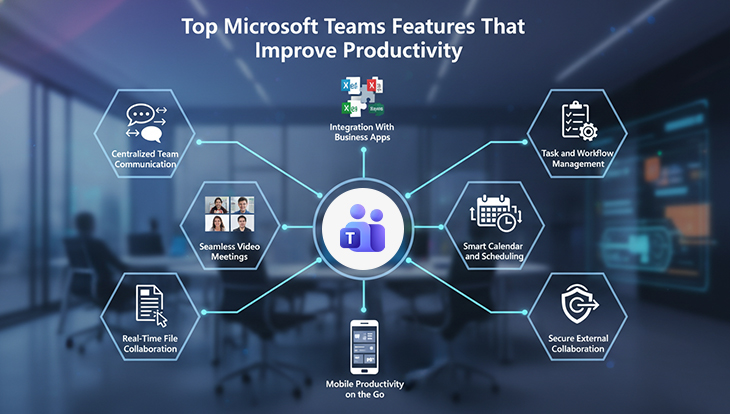
1. Centralized Team Communication
One of the biggest productivity killers is fragmented communication. When conversations happen across email, WhatsApp, and calls, updates are missed. Microsoft Teams solves this by centralizing communication into channels and chats.
For example, a sales team can have one channel for leads, another for proposals, and another for client escalations. This structure reduces noise and helps people find information quickly.
2. Seamless Video Meetings
Microsoft Teams offers HD video meetings with screen sharing, meeting recording, live captions, and scheduling through Outlook integration.
Instead of relying on separate meeting tools, employees can start calls directly from chat or calendar invites. As a result, meetings become easier to join, manage, and document.
3. Real-Time File Collaboration
Teams integrates with SharePoint and OneDrive, allowing multiple users to edit documents simultaneously. This means teams no longer need to send several versions of the same file by email.
As a result, businesses save time and reduce version-control issues.
4. Task and Workflow Management
Managers can use Planner, To Do, and integrated apps to assign tasks, set deadlines, and track progress. Therefore, accountability improves and projects move faster.
5. Smart Calendar and Scheduling
Teams connects with Outlook calendars, making it easy to schedule meetings, send reminders, and avoid conflicts.
Employees can quickly check availability and book meetings without endless back-and-forth communication.
6. Secure External Collaboration
Businesses often work with clients, vendors, and consultants. Teams allows secure guest access so external stakeholders can join specific channels or meetings without exposing internal systems.
This improves collaboration while maintaining control.
7. Mobile Productivity on the Go
The Teams mobile app allows employees to chat, attend meetings, review files, and respond quickly while traveling or working remotely.
This is especially useful for sales teams, field staff, and leadership teams.
8. Integration With Business Apps
Microsoft Teams integrates with CRMs, project tools, HR platforms, Power BI, and hundreds of third-party apps.
As a result, employees can access multiple workflows from one platform, saving time daily.
These features make Microsoft Teams for Business India a practical solution for companies looking to improve speed, collaboration, and productivity in 2026.
How Indian Remote Teams Use Microsoft Teams Daily to Increase Productivity
This section is especially important because productivity gains come from real-world usage, not just features.
Sales Teams Use Teams for Faster Follow-Ups
Sales teams often coordinate between leads, managers, and support teams. With Teams, they can share customer updates instantly, review proposals together, and conduct remote demos.
Therefore, response times improve and deals move faster through the pipeline.
HR Teams Use Teams for Hiring and Onboarding
HR departments can conduct interviews, schedule orientation sessions, share policy documents, and run training workshops inside Teams. New employees can also join dedicated onboarding channels.
As a result, onboarding becomes more structured and efficient.
Operations Teams Reduce Delays
Operations teams often depend on quick approvals. Microsoft Teams enables real-time discussions, faster reviews, and quicker approvals. Instead of waiting hours for email responses, stakeholders can resolve issues immediately.
This helps reduce turnaround time significantly.
Leadership Teams Improve Visibility
Executives and managers can create leadership channels, monitor progress dashboards, and communicate priorities clearly. Consequently, decision-making becomes faster, and team alignment improves.
See Microsoft Teams in Action
Discover how Microsoft Teams can simplify communication, improve collaboration, and help your remote teams work faster every day.
Microsoft Teams Pricing Plans in India (2026)
One key reason businesses prefer Microsoft Teams is its flexibility. It is available through several Microsoft 365 pricing plans suitable for different company sizes.
Microsoft 365 Business Basic
Ideal for startups and small teams that need web apps, Teams meetings, cloud storage, and collaboration tools at an affordable price.
Microsoft 365 Business Standard
Best for growing companies that need desktop Office apps, Teams, email hosting, and advanced productivity features.
Microsoft 365 Business Premium
Suitable for organizations that require stronger security, device management, and compliance tools in addition to collaboration.
Enterprise Plans
Larger organizations with advanced governance, analytics, and enterprise-level needs often choose Microsoft 365 enterprise plans.
Since plans change over time, businesses should consult a trusted Microsoft Office 365 reseller or certified advisor for the latest pricing and license recommendations.
Why Buy Through a Microsoft 365 Partner Instead of Direct?

Many businesses compare buying directly from Microsoft versus working with a certified partner. While direct purchasing may seem simple, businesses often benefit more from guided licensing, deployment, and local support. Read our detailed comparison: Microsoft 365 CSP vs Direct India Buying Guide
However, partnering with an experienced provider often delivers more value.
Better License Selection
Companies frequently overpay for unnecessary licenses or miss features they need. A Microsoft 365 partner can map plans to business goals and optimize cost.
Faster Deployment
Setup includes domain configuration, user creation, security settings, migration, and training. A specialist partner handles these tasks efficiently.
Local Billing and Support
Indian businesses often prefer local invoicing, GST-ready documentation, and faster support responses. That is another advantage of choosing a regional provider.
Ongoing Guidance
As your business grows, your collaboration needs evolve. Partners can help with upgrades, governance, and adoption strategies.
Why Choose FES Cloud as Your Microsoft 365 Partner in India
Choosing the right implementation partner matters as much as choosing the software itself. FES Cloud supports businesses with Microsoft 365 consulting, licensing, deployment, and post-sales assistance.
Key advantages include:
- Guidance on the best Microsoft 365 pricing plans
- Microsoft Teams rollout for remote and hybrid teams
- User migration from legacy platforms
- Security-focused implementation
- Responsive local support
- Scalable solutions for SMEs and enterprises
Whether you need 10 licenses or 1,000 users onboarded, an experienced provider can make the transition smoother and faster.
Cities We Support Across India
Remote work tools are in demand across every major business hub. Companies in Chandigarh, Noida, Mumbai, Delhi, Pune, Bengaluru, Hyderabad, Kolkata, and other cities are adopting Microsoft Teams to modernize operations.
If your workforce is spread across multiple branches, Teams can bring everyone into one connected workspace. This is especially useful for sales networks, service teams, consultants, and multi-location enterprises.
Final Thoughts: Increase Productivity with Microsoft Teams in 2026
The future of work in India is collaborative, flexible, and cloud-driven. Businesses that continue relying on disconnected tools may face delays, communication gaps, and slower growth. In contrast, companies using Microsoft Teams for Business India can streamline workflows, improve accountability, and help teams perform at a higher level.
If you want to improve how your remote teams communicate and deliver results, now is the right time to invest in a smarter platform.
Find the Right Microsoft Teams Solution for Your Business
Compare Microsoft 365 pricing plans, get expert guidance, and choose the best setup for your team with help from FES Cloud.