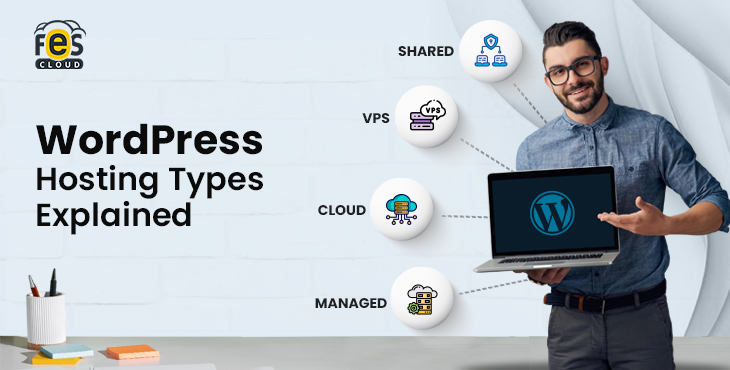
Choosing the wrong WordPress hosting type can slow your website, hurt SEO rankings, and limit growth before your content even gets noticed. Whether you’re launching a blog, business website, WooCommerce store, or agency project, your hosting directly affects speed, uptime, security, and scalability. In this guide, we compare the 5 main WordPress hosting types in 2026 — Shared, VPS, Cloud, Managed, and Dedicated — so you can choose the best option for your website and budget.
If you’re new to hosting, you can also read our beginner’s guide on the basics of WordPress hosting before comparing the available types.
What is the Difference Between WordPress.org and WordPress.com?
Before choosing a WordPress hosting type, you need to understand one critical distinction: WordPress.org vs WordPress.com.
WordPress.org is a self-hosted platform, meaning you install WordPress on your own hosting provider and have complete control over your website — including plugins, themes, performance, and monetization. This is the standard choice for business websites, blogs, and e-commerce stores.
WordPress.com is a fully hosted service that manages everything for you. While it is easier to start, it comes with limitations on customization, plugin access, and control — especially on lower-tier plans.
| Feature | WordPress.org | WordPress.com |
|---|---|---|
| Hosting | Self-hosted | Included |
| Control | Full control | Limited |
| Plugins | Fully customizable | Restricted |
| Monetization | Fully flexible | Limited |
| Best For | Businesses, blogs, and e-commerce | Beginners, hobby sites |
Key takeaway:
If performance, SEO, and long-term growth matter, WordPress.org with a reliable hosting provider is the right choice. All hosting types discussed in this guide apply to WordPress.org websites.
Why Most Businesses Choose WordPress.org
For serious websites, WordPress.org remains the preferred choice because it gives complete ownership and flexibility.
With self-hosted WordPress, you can:
- Choose your own hosting provider
- Install any plugin or theme
- Improve speed and SEO performance
- Run WooCommerce stores
- Scale without platform limitations
- Fully control monetization
For businesses planning long-term growth, WordPress.org with quality hosting is usually the smarter option.
Types of WordPress Hosting Explained
There are five main types of WordPress hosting, each built for a specific use case — from small personal sites to high-traffic business platforms.
Types of WordPress Hosting
- Shared Hosting → Affordable and beginner-friendly, with limited performance
- VPS Hosting → Dedicated resources with more control and stability
- Cloud Hosting → Scalable, high-performance hosting for growing websites
- Managed WordPress Hosting → Fully optimized and managed environment
- Dedicated Hosting → Maximum performance and control for large-scale websites
Quick Comparison
| Hosting Type | Best For | Cost (2026) | Performance | Management |
|---|---|---|---|---|
| Shared | Beginners, small sites | $3–$10 | Basic | Fully managed |
| VPS | Growing websites | $20–$60 | Good | Partial |
| Cloud | Businesses, scaling sites | $20–$80 | Excellent | Flexible |
| Managed WordPress | Non-technical users, businesses | $25–$100 | Excellent | Fully managed |
| Dedicated | Enterprise, high-traffic | $80–$300+ | Maximum | Full control |
Hidden Costs to Watch For
The advertised price of a hosting plan rarely tells the full story. Before committing, it’s worth understanding the costs that often appear after signup.
Renewal Price Increases
Many providers offer a discounted introductory rate, with prices increasing significantly at renewal — sometimes 2–3x the initial cost. Always check the renewal price, not just the first-term price.
Migration Fees
Moving an existing website to a new host can involve migration charges, especially for larger sites or those requiring manual database transfers. Some providers include free migration; others charge per site.
Resource Overage Charges
Shared and entry-level VPS plans often cap CPU, storage, or bandwidth usage. Exceeding these limits can trigger additional charges or forced upgrades, particularly during unexpected traffic spikes.
Add-On Costs
SSL certificates, daily backups, staging environments, and premium support are sometimes bundled into higher-tier plans but charged separately on cheaper ones. Confirm what’s actually included before comparing prices across providers.
Downgrade and Cancellation Terms
Some providers apply cancellation fees or require long-term commitments to access advertised pricing. Understanding contract terms upfront avoids unexpected costs later.
Takeaway: Compare the true 12-month cost — including renewals, add-ons, and potential overages — rather than the first-month price alone.
Shared WordPress Hosting: What It Is and Who It’s For
Shared WordPress hosting is an entry-level hosting environment in which multiple websites run on the same server and share a pool of resources, including CPU, RAM, and bandwidth. Because these resources are distributed across many sites, performance can vary depending on overall server activity.
Think of it like a coworking space: it works efficiently when usage is low, but performance can drop if other websites consume more than their share.
Pros:
- Cost-effective, making it suitable for beginners and small websites
- Fully managed by the provider, with no technical setup required
- Quick and easy to launch
Limitations:
- Performance can fluctuate due to shared resource usage
- Limited control over server configuration
- Not suitable for high-traffic websites or sudden spikes
Best For:
- Personal blogs and hobby websites
- Portfolio or brochure-style sites
- Early-stage projects with predictable traffic
Typical Cost (2026): $3–$10/month
VPS WordPress Hosting: How It Works and When to Use It
VPS (Virtual Private Server) WordPress hosting is a step up from shared hosting, where your website runs in an isolated environment with dedicated server resources. This isolation ensures more consistent performance and greater control compared to shared hosting.
Think of it as moving from a shared workspace to a private office — you still share the infrastructure, but your resources are reserved and unaffected by others.
Managed vs Unmanaged VPS
- Managed VPS: The provider handles maintenance, updates, security, and monitoring
- Unmanaged VPS: You manage setup, optimization, and security
Benefits:
- Isolated resources for stable and predictable performance
- Greater control over the server environment and configurations
- Better suited for dynamic and growing websites
Limitations:
- Requires technical expertise (unless managed)
- Does not scale automatically like cloud hosting
- Higher cost than shared hosting
Best For:
- Websites outgrowing shared hosting
- WooCommerce and dynamic platforms
- Developers needing server-level control
Typical Cost (2026): $20–$60/month
Cloud WordPress Hosting: Why It’s the Best Choice in 2026
Cloud WordPress hosting runs your website across a distributed network of servers rather than on a single machine. This allows your site to access resources dynamically, ensuring better reliability, scalability, and consistent performance.

Unlike traditional hosting, there is no single point of failure — if one server fails, another automatically takes over.
Cloud hosting has become a preferred option for growing websites due to scalability and reliability.
- No dependency on a single server
- Automatic scaling during traffic spikes
- High uptime with built-in redundancy
- Consistent performance under varying load
Performance Advantages
Modern cloud hosting environments typically include:
- NVMe storage for faster data access
- Redis object caching for improved backend performance
- Latest PHP versions (8.3+) for efficiency
- Integrated CDN for faster global delivery
These features work together to deliver fast load times and smooth performance, especially for dynamic WordPress websites.
Modern cloud platforms like FES Cloud are built around this scalable architecture, combining performance optimization with real-time resource flexibility.
Regional Advantage (SEO Impact)
Server location plays a direct role in website speed.
For businesses targeting regions like India or the Middle East, choosing WordPress hosting in India with nearby server nodes reduces latency and improves load times. This directly supports better Core Web Vitals and stronger search performance.
Best For:
- Business websites and scaling platforms
- e-commerce and high-traffic sites
- Content-heavy or dynamic WordPress websites
- Agencies managing multiple projects
When It May Not Be Necessary:
- Very small websites with minimal traffic
- Projects with extremely limited budgets
Typical Cost (2026): $20–$80/month
Why Indian Server Location Matters for SEO
If most of your visitors are in India, hosting your WordPress website closer to Indian users can significantly reduce latency and improve page load speed.
Benefits of local hosting include:
- Faster loading across India
- Better Core Web Vitals scores
- Improved user experience
- Stronger local SEO signals
- Faster checkout speed for Indian eCommerce stores
For businesses targeting India-first traffic, WordPress hosting with Indian infrastructure can create a measurable performance advantage.
Signs It’s Time to Upgrade Your Hosting
If you’re experiencing any of these issues, your current hosting may be holding your website back:
- Slow loading during peak traffic
- Frequent downtime
- Admin dashboard lag
- Poor Core Web Vitals scores
- Slow WooCommerce checkout
- Traffic growth is causing instability
- Security concerns or outdated software
Upgrading hosting often solves these problems faster than redesigning a website.
Reader Q&A: How Do I Know I’ve Outgrown My Current Hosting?
This is one of the most common questions website owners ask once traffic starts growing. Here’s a more specific breakdown of what to check.
Check Your Server Response Time (TTFB)
If your Time to First Byte consistently exceeds 600ms–800ms, even with caching enabled, your current server resources are likely struggling to keep up with demand.
Monitor Uptime Reports
Occasional downtime is normal, but if your monitoring shows recurring outages during peak hours specifically, that’s a sign your plan’s resources are being exhausted rather than experiencing a one-off issue.
Watch WooCommerce Checkout Speed
For online stores, checkout delays during busy periods (sales, holidays) usually point to database or resource limitations rather than a plugin issue.
Review Your Traffic Trend, Not Just Current Numbers
If your traffic has grown 2x or more over the past 3–6 months and continues trending upward, it’s often more cost-effective to upgrade proactively rather than wait for performance problems to appear.
Ask: Is This a Hosting Issue or a Website Issue?
Before upgrading, rule out unoptimized images, excessive plugins, or poor caching configuration — these can mimic hosting limitations. If performance issues persist after basic optimization, hosting is likely the bottleneck.
Quick self-check: If you’re seeing two or more of the signs above together, it’s a strong indicator that your current hosting type has reached its ceiling.
Ready to Move Beyond Basic Hosting?
If you need faster performance, better uptime, and room to scale, it’s time to switch to a WordPress hosting solution built for modern websites.
Managed WordPress Hosting: Is It Worth It?
Managed WordPress hosting is a hosting approach where the provider takes full responsibility for maintaining, securing, and optimizing your WordPress website. Instead of handling server management yourself, you run your site on an environment specifically built and maintained for WordPress.
What You Get
A managed hosting environment typically includes:
- Automatic updates for WordPress core and plugins
- Daily backups with quick restore options
- Built-in security, malware protection, and firewall configuration
- Server-level caching for faster load times
- Continuous monitoring and performance optimization
- Dedicated WordPress-focused support
Tradeoffs
- Limited control over server-level configurations
- Restrictions on certain plugins or custom setups
- Higher cost compared to basic hosting
Why It’s Worth It
Managed hosting eliminates the technical overhead of running a website. Instead of managing updates, security, and performance, you operate on a system that is continuously optimized in the background.
When combined with cloud infrastructure, it delivers both ease of use and scalability — making it a practical choice for business websites where performance and reliability directly impact results.
Best For:
- Non-technical website owners
- Business-critical websites
- WooCommerce and revenue-driven platforms
- Agencies managing multiple client sites
Typical Cost (2026): $25–$100/month
Dedicated WordPress Hosting: Who Actually Needs It?
Dedicated WordPress hosting gives your website access to an entire physical server exclusively reserved for your use. Unlike other hosting types, there are no shared resources — all CPU, RAM, and bandwidth are fully allocated to your website.
This results in maximum performance, complete control over the server environment, and a high level of security and isolation.
Benefits:
- Maximum performance with no resource sharing
- Full control over server configuration
- High security and isolation
Limitations:
- High cost compared to other hosting options
- Requires server management or a managed plan
- Often unnecessary for most websites
When It Makes Sense
- Very high-traffic WordPress websites
- Large-scale eCommerce or subscription platforms
- Media-heavy platforms with high concurrent users
- Projects with strict compliance or security requirements
When It’s Not the Right Fit
- Small to medium websites that only need better performance
- Projects where scalability matters more than full control
- Businesses that can achieve similar results with managed cloud hosting
Typical Cost (2026): $80–$300+/month
WordPress Hosting Types Compared: Which One Should You Choose?
Now that you understand each hosting type, here’s a direct comparison based on the factors that matter most for performance, scalability, and ease of use.
| Factor | Shared | VPS | Cloud | Managed | Dedicated |
|---|---|---|---|---|---|
| Performance | Low | Medium | High | High | Maximum |
| Scalability | None | Limited | Automatic | Automatic | Manual |
| Control | Low | High | Medium | Low | High |
| Skill Required | None | Medium | Low | None | High |
| Security | Basic | Medium | High | High | Maximum |
| Best For | Beginners | Growing sites | Businesses | Non-technical users | Enterprise |
| Cost (2026) | $3–$10 | $20–$60 | $20–$80 | $25–$100 | $80–$300+ |
Real-World Scenario Comparisons
Comparison tables help, but seeing how hosting types perform against real traffic and use cases makes the decision clearer.
Scenario 1: Personal Blog, ~5,000 Visitors/Month
A hobby or portfolio blog with steady, low traffic doesn’t need dedicated resources. Shared hosting comfortably handles this load at minimal cost, and the fully-managed setup means no technical maintenance is required.
Fit: Shared Hosting
Scenario 2: Local Service Business Website, ~15,000 Visitors/Month
A business site with contact forms, a blog, and moderate traffic benefits from more consistent performance than shared hosting offers, without the cost of dedicated infrastructure.
Fit: Cloud or Managed Hosting
Scenario 3: WooCommerce Store, ~500 Orders/Month
E-commerce sites need stable checkout performance, database speed, and uptime during traffic spikes (sales, promotions). Shared hosting risks slowdowns during checkout, which directly affects revenue.
Fit: Managed Cloud Hosting
Scenario 4: Agency Managing 10+ Client Sites
Agencies need flexibility to scale resources per client site without migrating servers each time a site grows. Cloud hosting’s on-demand scaling handles this without manual intervention.
Fit: Cloud Hosting
Scenario 5: High-Traffic News or Media Site, 500,000+ Visitors/Month
Large-scale content platforms with heavy concurrent traffic need maximum, uncontested resources and full server-level control to handle spikes during trending stories.
Fit: Dedicated Hosting
These scenarios illustrate that hosting decisions should be based on actual usage patterns and growth trajectory, not just current budget.
Best Hosting Type Based on Website Goal
- Personal Blog or Starter Website: Shared Hosting
- Small Business Website: Managed Cloud Hosting
- WooCommerce Store: Managed Cloud Hosting
- Agency Managing Client Sites: Cloud Hosting
- Developer Project / Custom Stack: VPS Hosting
- High-Traffic Enterprise Website: Dedicated or Advanced Cloud Hosting
How to Choose (Quick Decision Guide)
- Just starting with a small website → Shared Hosting
- Growing website needing better performance → VPS Hosting
- Business website or scaling platform → Cloud Hosting
- Want everything managed for you → Managed WordPress Hosting
- Need maximum control and resources → Dedicated Hosting
What We Commonly See During Migrations
Many websites moving from low-cost shared hosting to modern cloud environments often experience:
- Lower server response times
- Faster admin dashboard performance
- Improved uptime stability
- Better handling during traffic spikes
- Smoother WooCommerce performance
While results vary by website setup, hosting infrastructure often becomes the hidden bottleneck as websites grow.
How Hosting Affects WordPress SEO
Your hosting environment is not just a technical foundation — it directly influences how your website performs in search results. From page speed to crawl efficiency, hosting plays a measurable role in SEO outcomes.
Key SEO Factors Affected by Hosting
1. Core Web Vitals (LCP, INP, CLS)
Google evaluates user experience through Core Web Vitals. Faster hosting improves load speed and responsiveness, making it easier to achieve strong performance scores.
2. Server Response Time (TTFB)
TTFB determines how quickly your page begins loading. A slow server creates delays that no amount of frontend optimization can fully overcome.
3. Uptime and Crawlability
Frequent downtime or slow response reduces how often search engines crawl your site, slowing indexation and limiting visibility in search results.
4. Server Location and Local SEO
Hosting closer to your audience reduces latency, improving load times and strengthening local search performance.
5. Interaction Performance (INP)
Efficient server-side processing improves how quickly your site responds to user interactions, especially on dynamic WordPress pages.
What This Means in Practice
- Shared hosting often limits your ability to achieve strong performance metrics
- Cloud and managed hosting provide the consistency required for modern SEO
- Your hosting setup creates a structural advantage that plugins alone cannot replicate
How to Choose the Right WordPress Hosting
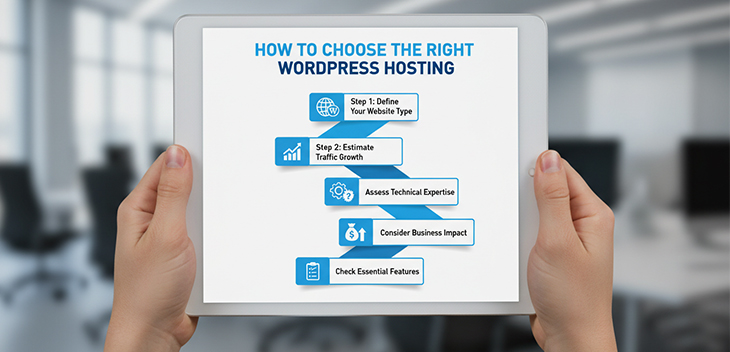
Choosing the right hosting isn’t about features alone — it’s about matching your website’s needs with the right level of performance, control, and scalability.
Step 1: Define Your Website Type
The more dynamic your website is (eCommerce, membership, or high-content platforms), the more performance and reliability you need.
Step 2: Estimate Traffic Growth
Don’t choose hosting only for today. Consider where your traffic will be in the next 6–12 months and plan accordingly to avoid early migration.
Step 3: Assess Technical Expertise
If you’re not comfortable managing servers or troubleshooting issues, managed hosting is the better choice over VPS.
Step 4: Consider Business Impact
Hosting is not just a cost — it directly affects revenue. Slow performance can lead to lost visitors and conversions.
Step 5: Check Essential Features
Look for hosting that includes:
- NVMe storage for faster performance
- Latest PHP versions (8.2/8.3+)
- Daily automated backups
- SSL certificate included
- CDN integration
- Advanced caching (e.g., Redis)
- Staging environment for safe testing
Quick Recommendation Guide
- Starting a small or personal website → Shared Hosting
- Growing website or business platform → Cloud or Managed Hosting
- WooCommerce or revenue-driven site → Managed Cloud Hosting
- Developer or custom projects → VPS Hosting
- Enterprise or high-traffic platform → Dedicated or advanced cloud
Can You Change WordPress Hosting Later?
Yes — you’re not locked into your initial hosting choice. However, switching hosting requires careful execution to avoid downtime or data issues.
What Migration Involves
- Website files and media
- Database transfer
- Domain and DNS updates
- Server-specific configurations
Common Risks
- Temporary downtime during migration
- Broken links or incorrect URL configurations
- Data loss or database errors if not handled properly
Best Practices for a Smooth Migration
- Use a staging environment before going live
- Test the website thoroughly after migration
- Take a complete backup before starting
- Update DNS only after verifying everything works correctly
Key Takeaway
While migration is manageable, it’s not risk-free. Choosing the right hosting from the start helps avoid unnecessary disruptions and ensures consistent performance as your website grows.
Conclusion
The best WordPress hosting type depends on your website goals, traffic level, and growth plans.
Shared hosting works for beginners. VPS suits technical users. Dedicated hosting is ideal for enterprise workloads.
But for most modern business websites in 2026, managed cloud hosting offers the strongest balance of speed, uptime, scalability, and ease of use.
If your website needs reliable performance without server headaches, it may be time to upgrade to a hosting platform built specifically for growth.